
Welcome to our Seller Managed Service Guide!
Need Help? Support Team Information
Contact us (8 AM - 8 PM EST, 7 days a week): Click here or email [email protected]
Printables!
- Printable lot stickers
- Pick up Signage (Single Sheet)
- Pickup Signage (4 sheets making a larger sign)
Helpful Resources:
- How do I use the Maxsold Seller App?
- How do I enter my payment details? OR How do I pay the auction proceeds to someone other than myself?
- How do I Group Items into Lots?
- Setting Auction Dates
- What can I and Can't I sell on Maxsold? (Item Policy and Do Not Sell list)
Get Started with Cataloging:
- Access the Maxsold Seller Tools and Create A Profile!
 On mobile, ensure you download the app with the white background.
- Group Items: Group similar items into lots. You are aiming for $35 in used-market value or $100 in store value.
- Quality Photos: Use good lighting and take at least 3 clear photos per lot, ideally from different angles. Be sure to include imperfections and damage. Transparency for a lower price is better than hiding the truth and risking a refund.
- Great Descriptions: Great descriptions have full disclosure and are as accurate as possible.
| Don't | Instead! |
|---|---|
| Write singular words | Include everything that might be relevant to an interested buyer (think about what would give you confidence to place a big or be competitive) |
| Hide imperfections/damage | Include them! While it might change the value of the item, it could still sell with imperfects and damages and the winning bidder won’t be surprised on pickup day. |
| Guess | Do a little digging and research. Accurate and truthful descriptions can be easy if you take the time to look into things. Certainty for the buyers could lead to a better final price! |
| Write “see photos” | Photos and descriptions work together to create an accurate image of something being bid on and purchased sight unseen. Good photos + a good description allows for confident bidding. |
Categories
To keep pickups smooth and safe, lots are labeled A, B, or C based on removal effort:
- A: Small items, easy to remove, easy to pack up (think dishes, crystal, knickknacks, a box of books)
- B: Slightly larger items that can still be removed fairly easily (like a lamp on an end table)
- C: Large or heavy items like furniture (takes more time, might require help, more difficult to remove, might be blocked by other categories or items)
Example: A China cabinet’s contents might be A, while the cabinet itself is B or C. This ensures it's empty before the buyer arrives to haul it.
A Quick Note on Category Z: Category Z items are to be picked up outside of the regular pickup window and requires sharing your contact information with the winning buyer. Think of a motorized stair lift that should be removed before the pickup, or a vehicle/trailer that should be removed after. They should be larger, more difficult to remove, or require special planning between you and the buyer.
More info here: What Are Pickup Categories?
Setting Dates (examples below from Desktop version)
From within the mobile app, or desktop app, the flow is simple and easy to follow:
1) Hit "Publish"
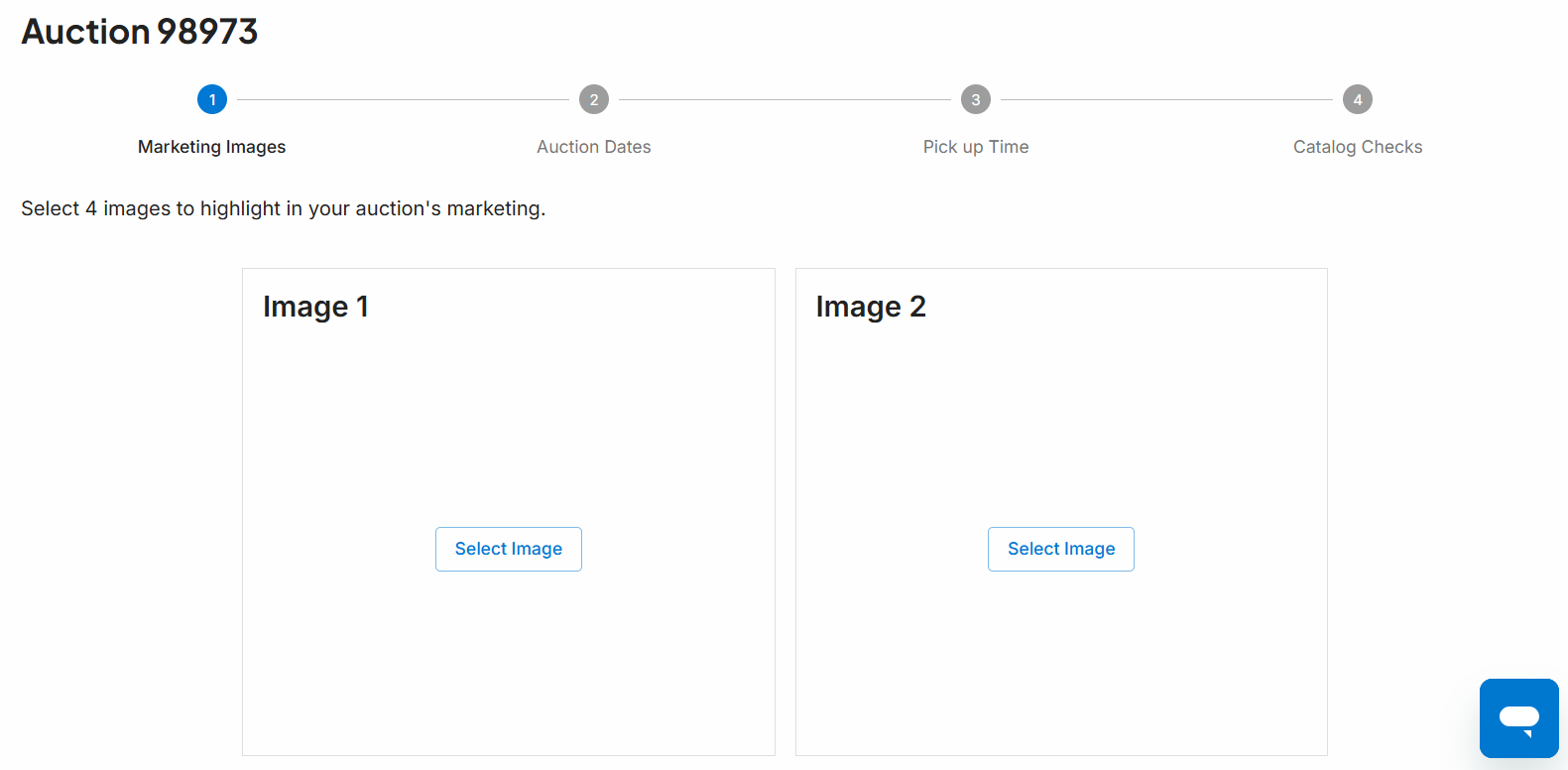
2) Select your marketing images (these will display on maxsold.com on the bid gallery page)
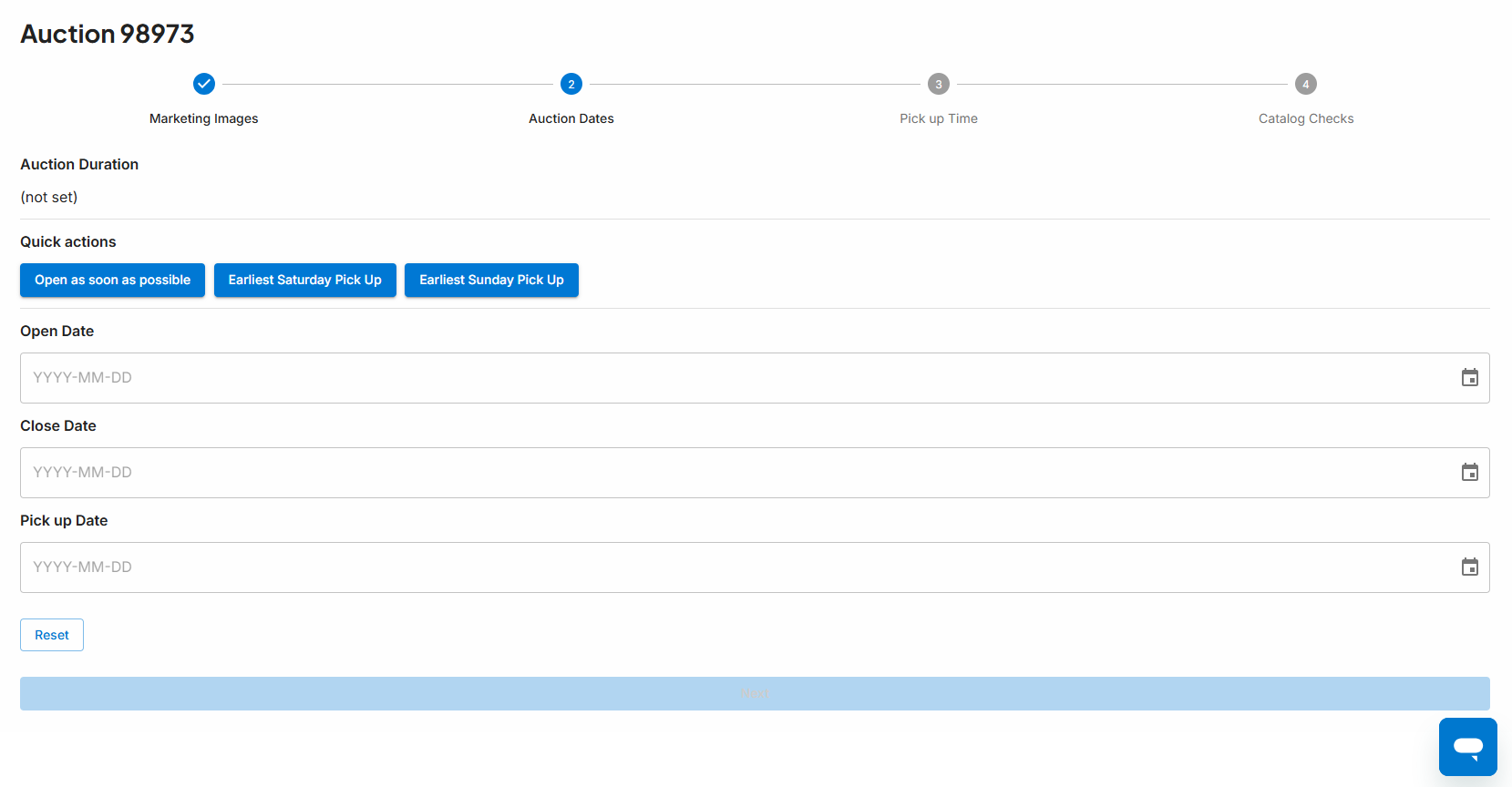
3) Select your dates (more information on that below!)
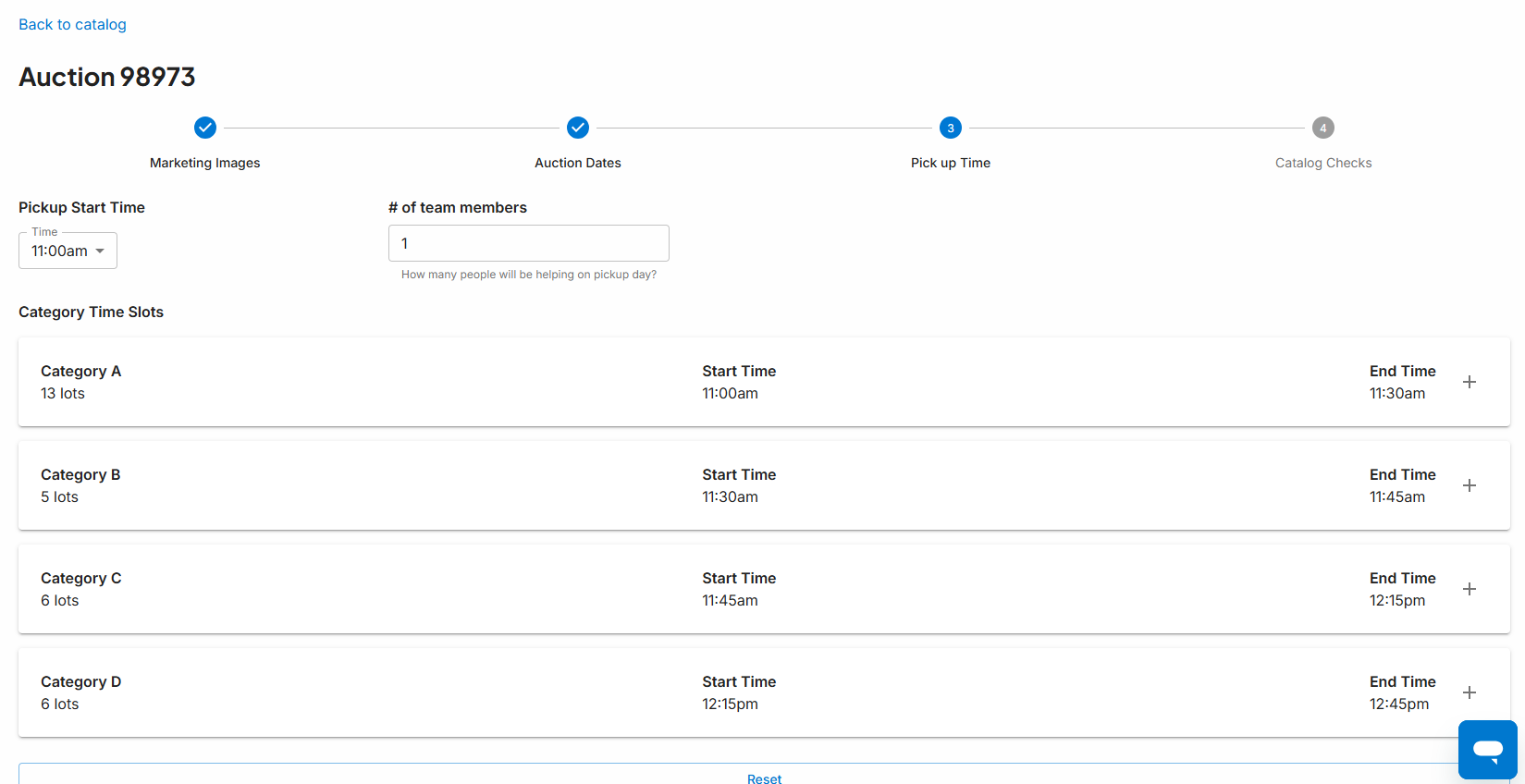
4) Select your pickup start time and how many people will be helping you
Your Auction Timeline:
The earliest your auction can launch is the day after you set your dates. So if you set them on Wednesday, the soonest it can go live is Thursday. This gives us time to prep everything.
Ideal time live: 7–11 days.
Short Notice Auctions: 3-5 days.
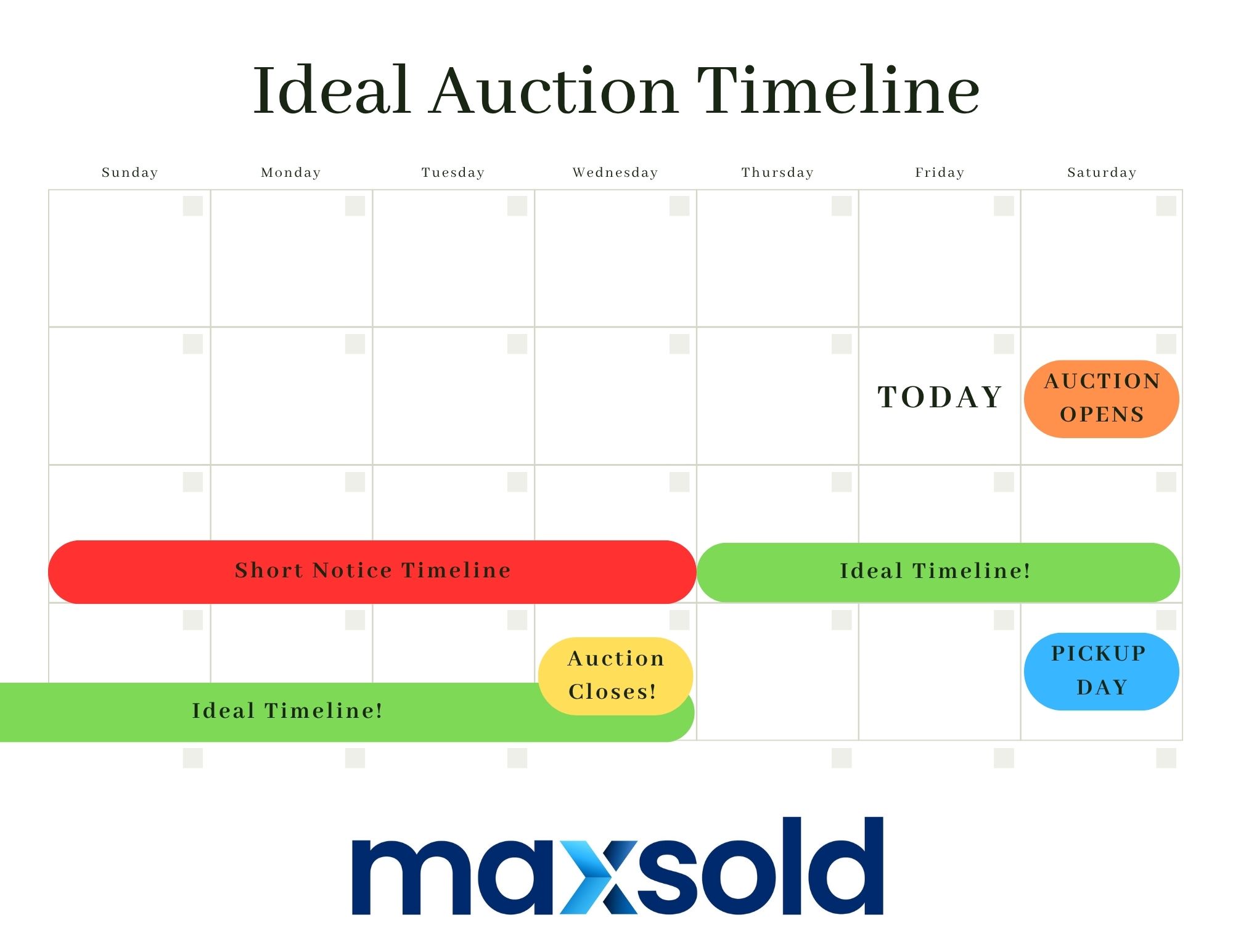
All auctions go live at 5PM local time on opening day.
Most pickups can be done in a single day. Got 150+ lots? Enlist some help to keep things running safely and smoothly.
Need alternate pickup options? No problem — once your auction ends, we’ll send you a Pickup Report where you can either set a backup date or allow us to share your contact info with buyers who need more flexibility.
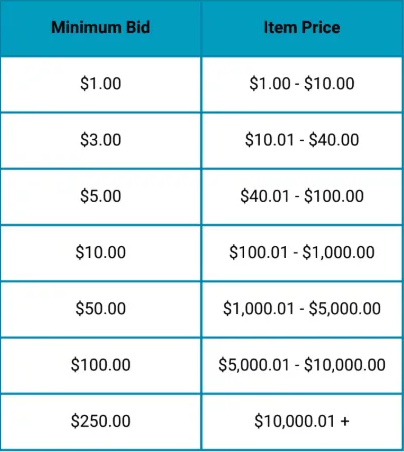
Once the auction is live, bidding will start at $1. Maxsold auctions have no reserve bids. This means some items may sell for as little as $1. To place a bid on a lot, the bidder must submit a bid of at least the minimum amount. The minimum bid is calculated by increasing the current bid price by the increments listed in the table to the right.
You will receive a link to your auction via email once it goes live. You can share this link with your family and friends, or even on your social media!
Don’t worry if early on you’re not seeing a lot of activity on your auction. Much of the action occurs in the final days, and then a surge in the final hours and minutes. We are working behind the scenes to ensure we are creating attention and competition on your items.
Pickup Day:
Pickup happens at minimum 2 days after close.
The day after close, you’ll get an invoice report listing all buyers and their purchases — keep it handy on pickup day to stay organized and track who’s taken what.
During pickup, either you or a helper should escort buyers as they collect their items.
Buyers are responsible for bringing:
- Help for heavy lifting
- An appropriate vehicle to fit their items
- Boxes, packing materials, and tools for disassembly (excluding items tied to home utilities which you as the seller need to disconnect)
You are not required to supply packing materials or help with removal.
A little Extra:
- Commission Fees: 30% of auction proceeds or $99.00, whichever is greater.
- If auction proceeds don't fully cover fees, the seller will be invoiced for the balance. Ensuring you have “The Three V’s”—Variety, Volume, and Value—will help with maximizing your profits.
- Payment Timeline: Seller payouts can take up to 14 business days after auction close.
- Refunds: Refunds should be discussed with you (the seller) at pickup and noted on the Seller Report.
- Additional Fees: The hope is that everything is accurate once the dates are set. However, if changes are needed such as edits, removals, or modifications, these are subject to fees and will be applied to your settlement at $50 per hour minimum 1 hour charged before the close of the auction. After close, lot removals or lots not delivered to the buyer can be charged at $200 per lot.
- Property Damage During Pickup:
- Homeowner’s insurance is primary for any incidents.
- Homeowner is responsible for repair costs.
- Bidding Restrictions:
- Sellers cannot bid on their own auctions, nor can they have someone bidding indirectly on their behalf.
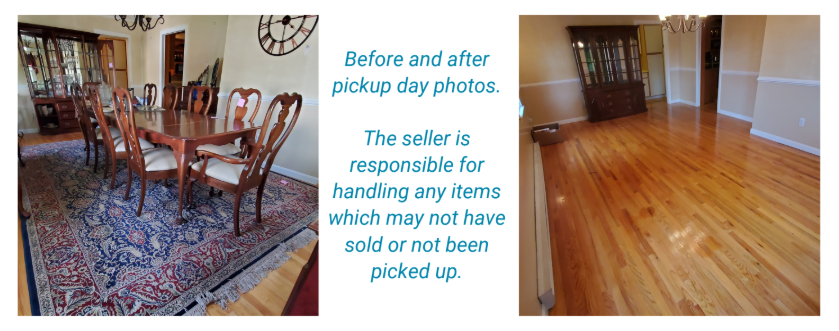
- Unsold Items: Anything unsold in the auction reverts back to the seller’s possession to do with as they please. You can give away at pickup, sell privately, donate, or dispose as you see fit.
- Obtaining Permission from Governing Bodies of your property such as rental, business, HOA, or Gated Communities: Anybody with the ability to shut down the pickup event should be made aware that you intend on having a pickup event there. Property Owner/HOA Approval Questionnaire must be completed to ensure compliance with property rules and a smooth pickup. This includes:
For questions about this, please reach out to our support team: maxsold.com/contact
- Home owner’s associations
- Condo boards
- Landlords
- Gated Communities
- Any governing body
Auctions